
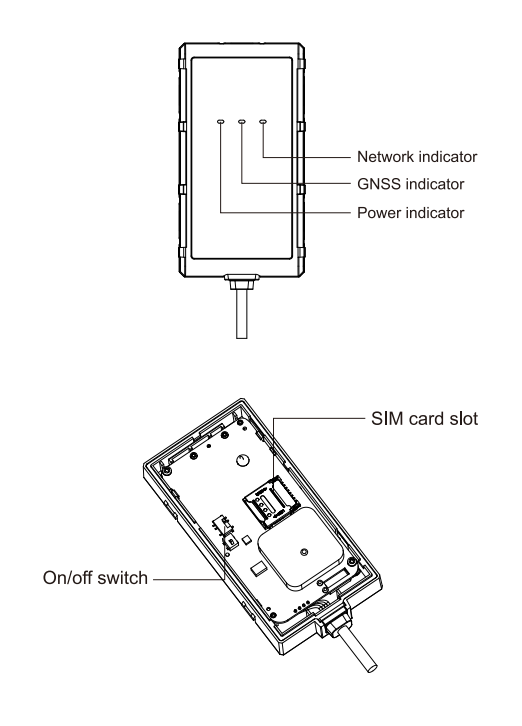

El VL03 de Concox es un rastreador GPS avanzado que permite ser configurado de forma remota mediante comandos SMS. Esta funcionalidad es ideal para realizar la puesta en marcha sin necesidad de una PC.
En esta guía te presento los comandos más importantes y utilizados, explicando su sintaxis y función para que puedas configurar tu equipo fácilmente.
📋 Tabla de comandos básicos
| VERSION# | Consulta la versión del Firmware | |
| STATUS# | Consulta de estatus del equipo | |
| PARAM# | Consulta de parámetros (IMEI, numeros para llamada de SOS, y zona horaria) | |
| WHERE# | Consulta de localización | |
| URL# | Consulta de localización con link | URL# Network connected and position fixed: <05-22 10:53> http://maps.google.com/maps?q=N23.111712,E114.409264 Network not connected but position fixed: <05-2210:53> http://maps.google.com/maps?q=N23.111712,E114.409264 Network not connected and position not fixed: NO DATA! |
| GPRSSET# | Consultar parámetros de red (estado GPRS, APN. dirección del servidor, URL, etc.) | GPRSSET# GPRS.ON; Currently use APN:CMnet,;APN Auto set:OFF: SERVER,1,test.topstargps.com, 11139:URL. http://maps.google.com/maps?q= |
| APN# | Establece APN | APN, apnname# OR APN, name,user,pwd# Close automatic APN and set by yourself. APN# Check the current APN parameters. |
| SERVER# | Establecer los parámetros del servidor de monitoreo | SERVER,mode,domainName/IP, port,protocol# eg:SERVER,1,www.ydpat.com, 8011,0# SERVER,0,211.154.135.113, 8011,0# mode = 1 means set with domain name mode = 0 means set with IP address protocol = 0 means connect the server with TCP protocol protocol = 1 means connect the server with UDP protocol SERVER* Check the current severe parameters |
| SOS# | Establecer números SOS | SOS,A,phone number 1,phone number 2,phone number 3# Add SOS phone number. SOU/sequence number 1, sequence number 2,sequence number 3# Delete the phone number according to the sequence number. SOS.D.phone number# Delete the matching SOS phone number. SOS# Check the SOS phone number. |
| TIMER# | Establezca el intervalo de tiempo para Módulo GNSS para enviar datos | TIMER.T1.–12# T1=5-18000 or 0. upload interval when ACC ON, unit: seconds; 0 means no upload; default is 10: T2=5-18000 or 0, upload interval when ACC OFF, unit: seconds; 0 means no upload; default is 10. TIMER# Check the current parameters of T1 and T2. |
| RELAY# | Control del relay para bloqueo de motor | RELAY, A# A=0/1:0 means connection. 1 means cut off;default: 0. RELAY# Check the status of the control. |
| ADT# | Establecer parámetros para cargar voltaje valores de la batería externa | ADT,A,T# 4=0N/OFF, On/Off ADC data Jpload,default: Off 3=5-3600, Default: 600s; Upload arne interval,unit: seconds ADT,OFF# Turn off analog data upload ADT# Query the ADT port parameters |
| RESET# | El dispositivo se reinicia 20 segundos después de recibir el comando. | RESET# The device would reboot in the 20S after receiving the command. |
| SPEEDCHECK# | Configurar y consultar la alerta de cambio repentino de velocidad | SPE EDC HECK ,ON,M,T,A,D# M=0/1,alarm reporting method, ) 0: only GPRS, 1: GPRS+SMS,default: 0 T=1-30, detection duration, unit: seconds, default: 4 A=10-300(km/h),threshold of Harsh acceleration speed difference default 30 D=10-300(km/h), difference threshold for sudden brake deceleration speed, default 50 SPEED CHECK, OFF# Turn off the SPEED CHECK alarm SPEEDCHECK# Query the SPEED CHECK port parameters |
| SWERVE# | Configurar y consultar la alerta de curvas cerradas | SWERVE,ON,M,A,S,T# M=0/1/.alarm reporting method. 0: only GPRS, 1: GPRS+SMS. default: 0 A=10-180(degrees).trigger alarm Angle Threshold. default 30 S=10-200(km/h).ffigger alarm Speed threshold, default 60 T=1-30 detection duration, unit: seconds, default 3 SWERVE, OFF# Turn off the SWERVE alarm SWERVE# Query the SWERVE port parameters |
| PULLALM# | Establecer tamper alerta | PULLALM,ON,M.N,T# M=0/1/, alarm reporting method, 0: only GPRS, 1: GPRS+SMS, default: 0 N=1-40, Threshold of mean change, unit:0.1g g: acceleration of gravity, default 30 T=2-10 The time interval between power cut-off event (triggered before rollover) and rollover event, unit: seconds, default 5 PULLALM, OFF# Turn off the PULLALM alarm PULLALM# Query the PULLALM port parameters |
- El símbolo
#indica el final del comando
✅ Ejemplo de configuración rápida por SMS (TELCEL)
- Configurar el APN:
APN,internet.itelcel.com#- Establecer servidor:
SERVER,0,123.456.78.0,8800,0#
- Configurar reporte cada 30 segundos:
TIMER,30,1200#
⚠️ Recomendaciones
- Asegúrate que la SIM tenga datos móviles activos y sin PIN.
- Siempre verifica con el comando
GPRSSET#antes y después de enviar configuraciones.

